
tl;dr
- Ralph loops allow for autonomous work but are difficult to use without generating AI slop
- jr is a mostly-autonomous workflow focused on generating quality code that extends upon the project structure mentioned in my last article
- jr is available at github.com/snapwich/jr
If you’ve been paying attention to the agentic coding space lately, you’ve probably come across the concept of a “ralph loop.” The idea, popularized by Matt Pocock and others, is straightforward: put your AI coding agent in a bash loop and let it churn through work autonomously. You write a prompt file that tells the agent how to read its state from disk (a task list, a progress file, specs), pick the next piece of work, implement it, commit, and exit. Then the loop restarts, the agent reads the updated state, and does it again.
while true; do claude --print PROMPT.md; doneFire and forget. You kick it off before bed and wake up to a pile of commits.
It’s a compelling idea, so I started experimenting with it and learned a bit about why ralph loops have the reputation they do.
The problem with Ralph
Ralph loops are often associated with AI slop, and even their proponents tend to acknowledge this. This is because the quality of what comes out depends heavily on the scaffolding around the loop: the specs; the prompt engineering; and most importantly, the verification, which is often a low priority compared to long-running continuity. Ralph loops can produce good results (this entire article describes a heavily modified one that I think produces good results), but the default structure makes consistently generating high-quality code very difficult.
Autonomous execution is so highly prioritized that the agents are often encouraged to gloss over problems for the sake of continuous operation. When something goes wrong, whether it’s an unexpected error, an ambiguous requirement, or a decision that needs human judgment, your basic Ralph loop doesn’t stop and ask. It works around it and keeps going. Continuous execution is the goal, and the end result suffers for it.
This would be less of a problem if specs were perfect, but they never are. No plan, spec, or Jira ticket for non-trivial work is ever fully fleshed out with every requirement and edge case accounted for. Try as you may, there will always be gaps. In my opinion, this is fundamentally why agile has proven more successful than waterfall. It can deal with this. In a ralph loop, with its push for continuity above all else, these gaps don’t get surfaced. They stack up iteration after iteration without human course correction. The agent makes its best guess, moves on, and the next iteration does the same. The cumulative effect of going so long without intervention is code that has drifted far from what you actually wanted.
Some ralph loop setups try to address this with some kind of progress.md that persists between iterations. These can
help with continuity, but they introduce their own problem: everything goes into the same flat file regardless of what
it is, who needs it, or what role it’s meant to serve. There’s no distinction between “context for the next
implementation task” and “a decision the reviewer should know about” and “a requirement that was discovered
mid-implementation.” The information is preserved but not structured, so it’s only marginally better than digging
through the git log and can often just introduce agent distraction.
Finally, it doesn’t help that the agent reviewing the code is usually the same agent that wrote it. Even with context resets between iterations, the next instance carries the same system prompt, the same biases and tendencies. It’s predisposed to agree with decisions made by its predecessor rather than genuinely critique them. But this is more of a contributing factor than a root cause. The real damage comes from the unchecked accumulation of drift over a long autonomous run.
Introducing jr (just ralph)
The appeal of ralph loops is real: autonomous, long-running work that doesn’t require your constant presence. But I couldn’t use something that produced worse results than me just coding myself. I needed code I could ship in an enterprise setting. This led me down the path of automating my manual workflow to the extent I could without sacrificing quality.
In a previous article I described how I work with AI
agents: a secure container, git worktrees for parallel workspaces, tmux for managing terminals and agents, and
gwtmux for linking worktrees to tmux windows so I can quickly jump around
various PRs in progress. It’s a powerful setup, but in it I am the one that orchestrates how the work gets done. I’m the
one creating worktrees, starting agents and prompting them, deciding what gets worked on next, reviewing results, and
creating PRs.
jr automates that orchestration while preserving the same workflow. Now jr is the one creating the worktrees, starting and managing agent context, and managing the lifecycle of concurrent PRs.
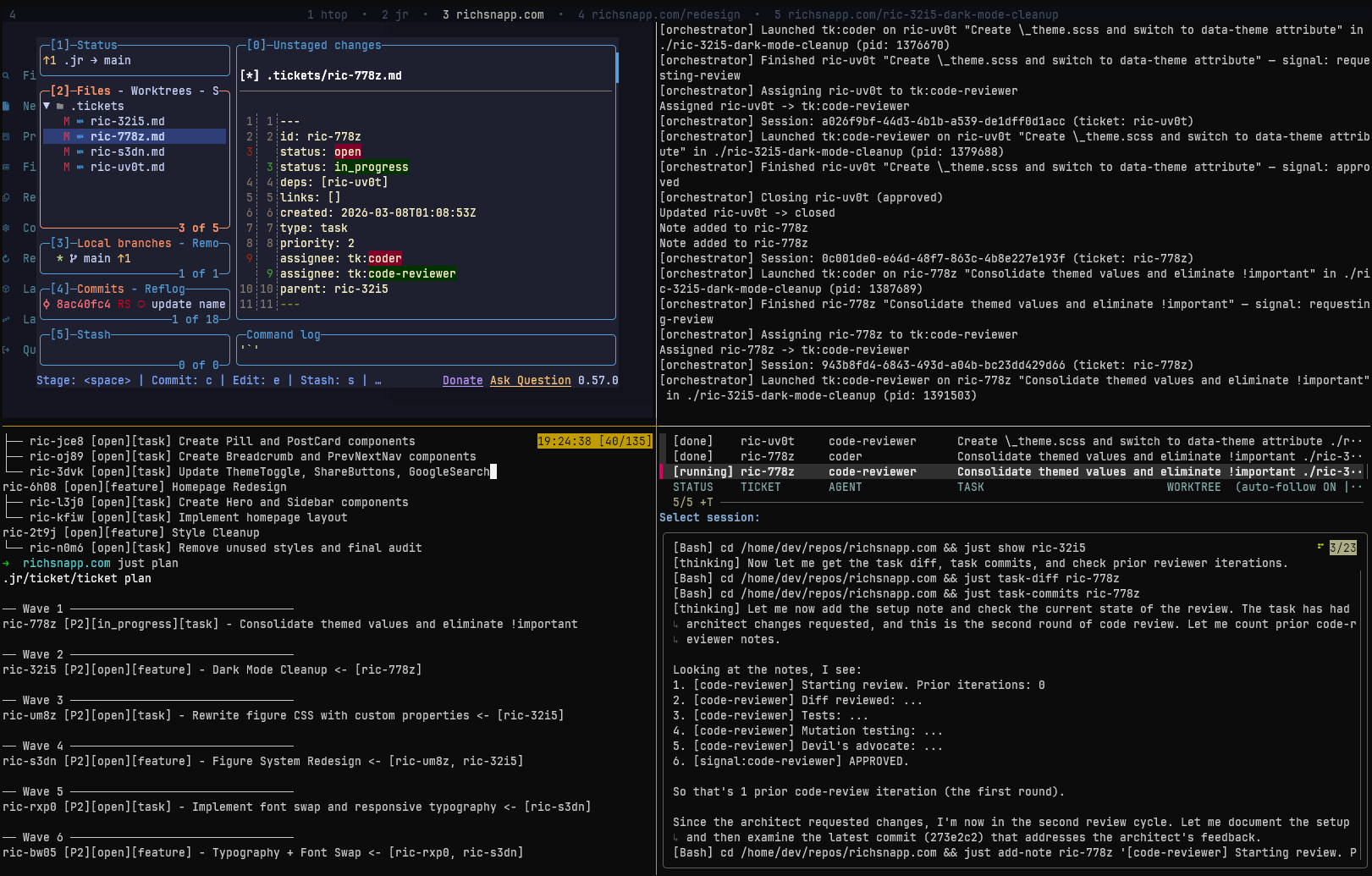
The best part: since this orchestration models my existing workflow I can still step into any worktree at any time, see agent output, jump into the code and validate or modify it. The worktrees are right where I would expect them to be on the filesystem with the agents working in them.
I made this a hard requirement.
I feel like many working on agent orchestrators right now are designing systems that are a black box. They have sophisticated workflows that can do all kinds of work, but when something breaks or the results are bad there’s no easy way to step in and understand what went wrong. You’re expected to trust agents the whole way through, and, in my personal opinion, agents are not there yet. I wanted something where debugging the process is as natural as debugging my own code, because it’s built on the same tools and workflows I already use.
Currently jr is built to use Claude Code (although in reality it’s mostly a set of conventions. Adding a little configuration could allow it to be easily extended to work with different CLI agents), git worktrees, just (a modern command runner like Make), and GNU stow for linking to your existing project’s repos. It’s human-in-the-loop where it matters but it can do long stretches of work autonomously, running multiple features in parallel across separate worktrees, with deliberate checkpoints where you review completed work and optionally observe or intervene at any point in between.
How jr structures work
jr organizes work into two levels: features and tasks. A feature maps to a single PR and a single git worktree. Tasks are sequential units of work within the worktree that map to a series of commits. More on that here if you’re interested.
ric-3km6 [closed][feature] E2E Test Baseline
├── ric-vz43 [closed][task] Setup Playwright
├── ric-20gq [closed][task] Add accessibility attributes
├── ric-24f6 [closed][task] Write core page E2E tests
└── ric-2cp1 [closed][task] Write UI behavior E2E tests
ric-xm57 [closed][feature] LESS → Sass Migration
├── ric-wwqk [closed][task] Convert main style files
├── ric-1ktp [closed][task] Convert component styles
├── ric-vgpz [closed][task] Convert content module files
└── ric-s8q2 [closed][task] Audit and simplify styles
ric-fk2s [closed][feature] Bootstrap 3→5 Upgrade
├── ric-sdra [closed][task] Update bootstrap dep
├── ric-ixka [closed][task] Update BS3 classes
└── ric-vjic [closed][task] Create _compat.scss
ric-s3dn [open][feature] Figure System Redesign
└── ric-um8z [open][task] Rewrite figure CSS
ric-bw05 [open][feature] Typography + Font Swap
└── ric-rxp0 [open][task] Implement font swap
ric-jvxu [open][feature] Layout Refactor
├── ric-0hsq [open][task] Create Topbar component
├── ric-7g5f [open][task] Refactor DefaultLayout
└── ric-gr5f [open][task] Refactor BlogPage/BasicPage
just tree showing work in progressjr is unopinionated in how you plan your work. You can work from a spec, Claude planning session file, GitHub issues or JIRA tickets. What jr assists with is breaking those down into units of work that allow the orchestrator and its army of subagents to work on things as efficiently as possible. It breaks work down into an internal ticket system for you, working out the ticket hierarchy, tasks, and dependencies and focuses on how the work is done so you can focus on what work is done.
The ticket system is forked from tk (which has an API similar to beads without all the unnecessary complexities) and uses git-backed markdown files within a stand-alone ticket repository with its own git history. This keeps ticket operations, notes, and status changes out of your application’s git history. For projects that span multiple codebases, tickets can be shared across repos so that features and tasks can coordinate work across repo boundaries.
This structure of features and tasks is especially important for defining “where updated or new context goes” when the agents are working. For instance, if there is a decision the agent has to make that is important to the implementation but maybe not fully defined in the ticket, the agent can leave a note on the task for the reviewer. If the agent has to define a new requirement that revealed itself during implementation it can choose to leave a note on the feature (that all agents see when working on their tasks) for future agents, the architect to review, or even you during the human review. It also has the option to escalate immediately to the human if a particularly important requirement with severe ramifications sufaces while working on the project.
The project directory
If you read my previous article, you’ll recognize the
directory layout. jr builds on the same worktree structure: default/ as the main repository, feature worktrees as
siblings. Running just init ../<my_project> in jr against an existing repo (or empty directory) then sets up the files
jr needs to work. jr uses GNU stow (a symlink manager) to link its files into your
project. This means jr’s config and commands stay in sync with jr itself so that updating jr updates all your jr
projects.
my-project/                    # project root
├── .jr/                       # initialized git repository
│   ├── .tickets/              # the git-tracked tickets
│   └── claude/_/              # per repo extensions (if any)
├── .claude/                   # agent configs (stowed)
│   ├── agents/jr/             # coder, reviewer, architect
│   └── commands/jr/           # /plan-features, /retro
├── justfile                   # command file
├── default/                   # main branch checkout
├── proj-1234-e2e-baselines/   # feature worktree
└── proj-1235-less-to-sass/ # feature worktreejust init in a single-repo layoutFor projects spanning multiple codebases, jr also supports a multi-repo layout where each repo gets its own subdirectory
with default/ and feature worktrees, while sharing a .jr directory with a single ticket system and orchestrator
across all of them.
The deterministic orchestrator
Similar to ralph, the orchestrator is a basic bash loop but with return signals and a simple decision tree at the end of each loop.
Using a basic bash loop was a deliberate design choice. I found a non-deterministic agent orchestrator (an LLM deciding what to do next) would self-recover from certain problems in ways that look like they worked but were actually masking process issues. A deterministic orchestrator forced workflow problems to the surface. With jr, if something unexpected happens the issue is escalated to me where I can either resolve the process issue (which improves further runs) or fix an actual blocker that an agentic orchestrator may ignore or “solve” itself. This choice of a deterministic bash loop makes it easy to iteratively improve the workflow as well as write a test suite that allows AI to iterate on and improve the loop over time.
The orchestrator picks up ready work, starts agents in worktrees, and dispatches next steps based on signals that agents send back when they finish. An agent completes a task and signals “requesting review.” The orchestrator sees that signal and starts a code reviewer in the same worktree. The reviewer signals “approved.” The orchestrator marks the task as done and moves on to the next one.
Features can run in parallel across separate worktrees, while tasks within a feature run sequentially with one agent
working in a worktree at a time. This avoids some concurrency problems that come with multiple agents touching the same
workspace: conflicting file changes, shared git indexes, and the like. For global resources that live outside the
worktree (like application ports or databases) jr provides flock-based locking through just with-lock so that agents
in separate worktrees can wait for each other when needed.
The best part: all state lives in tickets. If the orchestrator crashes, gets interrupted, or you just want to stop and come back later, you can restart it and it picks up exactly where things left off.
Tasks and the agentic pipeline
Each task runs through a sort of agentic pipeline. Today that pipeline is straightforward: a coder implements the task, then a code reviewer reviews it. If the reviewer requests changes, the coder gets another pass. They iterate until the reviewer approves or an iteration limit is hit, at which point it escalates to the human.
In the future I plan to make this pipeline configurable with custom subagents and flows.
The coder gets scoped context: just the task, notes from itself or other agents, and a basic feature plan. It implements, runs tests, and commits. It’s not distracted by a bunch of feature context that is not related to the current task; it’s focused on its specific job.
The code reviewer starts with fresh context and has read-only access. It doesn’t have the coder’s context: its reasoning, false starts, or various decision-making processes; except the notes the coder specifically left for the reviewer.
Agents communicate through ticket notes. When a coder makes a decision, encounters something unexpected, or deviates from the original plan, it records that as a note on the ticket. Future agents (the reviewer, the architect, agents working on subsequent tasks) can read these notes and understand the context behind the code without inheriting the full context window that produced it.
For example during this blog’s redesign a coder converting LESS to Sass discovered that a .small() mixin call inside a
figure block resolved to a local &.small selector (float, width styling), not Bootstrap’s global .small
(font-size). Non-obvious, and easy to get wrong. It left a note on the ticket so that sibling tasks working on the same
styles would know. This allowed future agents to work with this knowledge in-hand without all the distracting context
that was generated discovering the issue.
The orchestrator can also inject project-specific context into subagents related to jr and the project. This allows agents to know how to work alongside other agents in the jr workflow within a specific project without that context having to live in the project itself or in jr. It’s specialized context stored alongside the tickets that bridges the gap between the generic agent definitions and your specific codebase (more on project extensions).
Features and the architect review
Once all tasks in a feature are complete, the feature goes through its own review cycle. The architect reviewer evaluates the full feature branch for coherence. This includes all the previous tasks that were part of the feature and implemented using multiple agents. The architect considers things such as: Does the implementation across all tasks make sense as a whole? Are there inconsistencies between what different tasks produced? Did the planned architecture hold up, or did it drift?
It considers dependent features as well. Does the current design as implemented meet the need of the features to come? Were there requirements missing from the plan that have now surfaced?
The architect is informed by all the notes agents left during task work. It hears about important decisions agents made and why, what was discovered during implementation, and where agents knowingly deviated from the plan. If something was missed or something doesn’t fit, the architect can reopen existing tasks or create entirely new ones. The system adapts to what’s discovered during implementation.
In my LESS-to-Sass migration on this blog, the architect reviewed the full feature branch and found that the old .less
files hadn’t been deleted and the less package was still in dependencies, both violating the feature’s acceptance
criteria. The code reviewer had let these slide (the code worked), but the architect caught them because it was
evaluating against the feature’s goals, not just the code’s correctness. It reopened the relevant task, the coder
cleaned it up and re-evaluated if things still worked without them, and the feature was completed without the dead
files.
Once a feature passes architect review, it gates for human review. If the orchestrator still has other non-dependent
work it can schedule it will do that while you are reviewing the completed feature, otherwise it will stop until your
review is finished and the loop is restarted. If it has other dependent work and you don’t want it to wait you can give
your initial approval and the orchestrator will continue using stacked PRs to continue working until the dependent
feature is merged. There are some convenience just commands around rebasing as well as a jr:rebaser subagent that can
help manage the stacked PRs if changes need to be made on a feature dependency.
Interacting with the loop
jr uses just to describe its interface in addition to a few claude slash commands.
Every operation is a recipe you can run from the terminal. The subagents and orchestrator also use the same justfile
but have separate sets of recipes that they use. Using recipes helps the subagents behave in a more consistent manner.
For you, the justfile is your main source of control. Approve a feature, request changes with feedback, inspect
tickets, check the status of running work, watch agent sessions, manage worktrees.
Available recipes:
    [human]
    approve feature-id                               # Approve a feature — validates, closes, prints next steps
    blocked *args                                    # Show blocked tickets — [-a ASSIGNEE] [-T TYPE]
    edit ticket-id *args                             # Open ticket in $EDITOR — [--children]
    locks                                            # Show status of all resource locks
    ls                                               # Show project layout — repos and their worktrees (mirrors `git worktree list`)
    merge-all *args                                  # Merge closed feature branches into base branch in dependency order
    plan                                             # Show execution order of plan in waves
    ready *args                                      # Show ready tickets — [--status=X] [-a ASSIGNEE] [-T TYPE]
    rebase-feature feature-id rework-notes=""        # Optional rework-notes: if provided, triggers a rework cycle after rebase (for API changes)
    request-changes feature-id feedback=""           # If feedback is omitted, opens $EDITOR for multi-line input.
    start-work *args                                 # Run the orchestration loop — discovers ready work, launches subagents, reacts to signals
    tree *args                                       # Show ticket hierarchy — [id] [--status=X] [-a ASSIGNEE] [-T TYPE]
    watch                                            # Watch a running or completed subagent session (auto-refreshing)
worktree-deps # Show worktrees in dependency order — merge leaves first, roots last [alias: deps]just human. If you’re interested: just alone will list recipes for everyone, including agents.In addition, while the orchestrator is working you can gwtmux into any worktree to see the code as it’s being written.
Read tickets as they’re being updated with notes to understand what happened and why an agent made a particular
decision. When something goes wrong (and it will, because agents are still agents) you’ll find it’s easy to dig in and
figure out what happened with the trail of evidence left behind.
There’s even a jr:retro claude command specifically meant for analyzing a feature after it’s completed to see what
went right and wrong and suggest improvements to the process.
Where to go from here
I’ve been using jr on multiple codebases, including enterprise projects, and the results have been genuinely good. It’s
not perfect, but it’s producing the kind of code I’m comfortable reviewing and shipping. If you’re interested in
long-running agentic work while avoiding AI slop, jr brings a strong mostly-autonomous workflow to the table. As agents
improve and require less oversight it could easily become fully-autonomous. I have just start-work --no-human-review
ready to go as soon as that day comes.
If you want to try it yourself, jr is available at github.com/snapwich/jr, just follow the instructions in the README.md. It currently requires Claude Code, just, and GNU stow. There’s still some work on my todo list to support non-claude or local models as well as generalize the agent pipeline to do more or different kinds of work with custom subagents (besides coder and code-reviewer).
Let me know what you think or if you have any questions feel free to post them below.